
Capture every feed.
Record SDI, HDMI, NDI, screen, and IP sources from one operational workspace—with per-channel formats, confidence monitoring, file automation, overlays, profiles, and logs.
Everything an ingest operator needs in view.
Build a repeatable recording workspace without burying the operator in engineering detail. Each channel shows the source, confidence picture, audio level, time, state, and controls that matter during a live session.
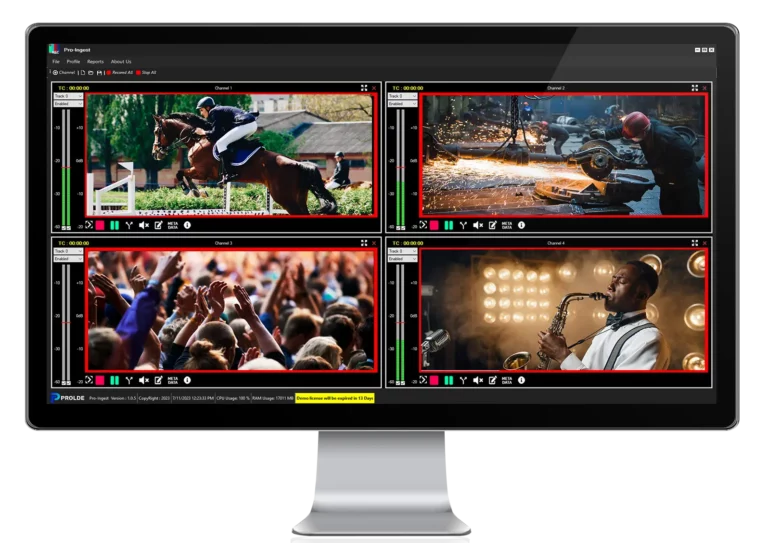
Multi-channel workspace
Configure multiple independently named channels and supervise them together. Licensed count and workstation capacity define the deployment.
Device and stream inputs
Select detected capture devices and formats or enter a supported network or file URL with optional source parameters.
Workflow-ready recording
Choose a container, video codec, audio codec, bitrate, video format, and audio format for each channel.
File automation
Use manual, automatic timestamp-based, or ask-before naming, with duration-based and operator-triggered splits.
Burned-in identification
Add a configurable timestamp, optional channel name, and customer logo at any corner of the recorded picture.
Profiles, metadata, and logs
Reload complete channel configurations, create XML sidecars, and review filterable operational records.
From incoming signal to managed media.
Acquire
Choose a capture device, NDI sender, screen source, or supported stream URL.
Verify
Preview picture, confirm the audio meter, and select the required input formats.
Record
Set container, codecs, bitrate, destination, naming, splitting, and overlays.
Deliver
Close validated files, preserve logs, and hand off metadata to the next workflow.
Run a four-channel ingest session.
Select a source and format, turn overlays on, start channels independently, split a recording, or coordinate the whole workspace. The simulator demonstrates the operator workflow; it does not process real media.
Purpose-built for broadcast acquisition.
Final capability depends on the installed license, media runtime, I/O drivers, hardware, and workstation resources.
| Input sources | Supported professional SDI and HDMI I/O from Blackmagic Design, AJA, Streamlabs, Bluefish, and other qualified manufacturers, plus NDI, screen capture, and supported URL sources including SRT, UDP, and RTMP. |
|---|---|
| Channel count | Licensed per installation; practical capacity depends on source formats, codecs, overlays, storage, and workstation sizing. |
| Recording | Runtime-supplied professional containers and codecs with per-channel video/audio formats and bitrate or codec properties. |
| Monitoring | Live picture, audio meter, full-screen view, monitor mute, channel time/state, and writer statistics. |
| Automation | Profiles, group start/stop, automatic or operator naming, duration-based split, and manual split. |
| Overlays | Configurable timestamp/channel-name overlay and PNG/JPEG/BMP logo at any corner. |
| Records | System and ingest logs with filtering and export; XML metadata sidecars. |
| Platform | Microsoft Windows, .NET Framework 4.8, qualified Prolde media runtime, and manufacturer I/O drivers. |
One acquisition layer for many productions.
Show us the feeds.
Share your source types, channel count, raster and frame rates, audio requirements, preferred files, event duration, storage, and downstream system. Prolde can help qualify the complete ingest path.
Request a demonstration